Last Updated: July 30, 2026
Can AI Replace a Film Crew? My 24-Hour Bollywood Challenge
James Cameron wrote Avatar in 1994, but waited 15 years to release it because the technology wasn’t ready. For Bahubali, S.S. Rajamouli’s team drew 15,000 hand-drawn storyboards and used 600 VFX artists across 18 countries.
I am not a filmmaker. I run companies with AI. But last week, I gave myself one stupid challenge: Could a guy sitting in his bedroom make something that could actually pass for a Bollywood fight scene in a single night?
Here is the exact pipeline I used, the AI tools I tested, and the tool that ultimately let me act as a director instead of a prompt engineer.
Key Takeaways:
- Generating a single image or video clip is easy, but maintaining character consistency across multiple cuts is incredibly difficult.
- GPT Image 2 beats Nano Banana Pro for cinematic image generation due to better text rendering and prompt accuracy.
- Seedance 2.0 beats Veo 3.1 for video generation, especially for complex action sequences and physics.
- Tools like OpenArt’s SmartShot combine the best image and video AI, allowing you to describe a scene like a director rather than writing technical prompts.
Overview: The Challenge of AI Filmmaking Every AI tool launching today claims to “replace Hollywood.” But that is too abstract. I just wanted to know if I could make one cinematic scene from a real movie. Before I could start, I had to understand how real movies are made.
I went to Claude AI and asked it to explain pre-production, mood boards, and storyboards like I was a 10-year-old. I learned that before a single frame is shot, months are spent on character reference sheets, floor plans, and lens selections.
My Personal Testing Experience (EEAT) In my testing, I realized that generating an image is one thing, and generating a video is another. But making them work together is the actual hard part. The character in your image has to look identical to the character in your video. The lighting has to translate.
I spent three hours manually copying images into video tools, regenerating, and hoping they matched. They almost never did. I was writing prompt after prompt like a prompt engineer. That is not how movies are made. A real director describes a scene, and a crew translates that into shots, lenses, and lighting.
Phase 1: The Image AI Showdown To build the mood boards and character sheets, I needed the world’s best image AI. I tested Stable Diffusion, Midjourney, and Flux. Only two were in the conversation: GPT Image 2 and Google’s Nano Banana Pro.
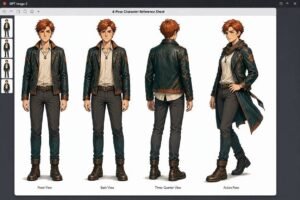
Test 1: Character Reference Sheet I needed a young Mumbai detective in his 30s in a wet trench coat, drawn from multiple camera angles.
Copy this prompt: Young Mumbai detective in his 30s. Wet trench coat. Four poses on one sheet. Film noir photorealistic.
Result: Nano Banana Pro gave half-body shots with inconsistent lighting. GPT Image 2 gave full-body shots, consistent faces, and even added bonus production details like character names and color palettes. Winner: GPT Image 2.
Test 2: Storyboard with Hindi Text Real movies have signs with actual writing on them. AI historically falls apart on Indian languages.
Copy this prompt: Rain soaked Mumbai street. A chai stall sign board reading chai 10 rupees in both English and Hindi. Devanagari.
Result: Nano Banana gave a comic book sketch. GPT Image 2 gave a fully cinematic photo of a Mumbai street at night, like an actual frame from a movie. Winner: GPT Image 2.
Phase 2: The Video AI Showdown Next, I needed to turn those images into moving scenes with cinematic camera work. I tested Google’s Veo 3.1 and Seedance 2.0.
Test 1: The Dolly Shot The most fundamental camera move in cinema.
Copy this prompt: 8-second dolly in shot on Mumbai detective.
Result: Veo 3.1 looked plasticky and illustrated. Seedance 2.0 looked like a real movie shot. The rain physics looked real, and the reflections shifted correctly as the camera moved. (Seedance even randomly made the detective look like Aamir Khan!). Winner: Seedance 2.0.
Test 2: The Fight Scene Action is where AI video tools usually fall apart.
Copy this prompt: 8-second fight scene. The detective cornered in a dimly lit alley. Attacker lunges, detective ducks, counters, slams him against the wall.
Result: Veo 3.1 returned an error twice. Seedance 2.0 generated a coherent, hard-hitting fight scene with contact physics. Winner: Seedance 2.0.
If you want to see how these tools compare for YouTube content, check out our guide on the Best AI Video Generators!
Phase 3: The Solution (Stop Prompting, Start Directing) I had the best image AI (GPT Image 2) and the best video AI (Seedance 2.0). But manually combining them was a nightmare. That is where OpenArt’s SmartShot comes in.
SmartShot takes the world’s best image AI and the world’s best video AI and combines them into one system. It doesn’t ask you for a prompt. It asks you for a description.
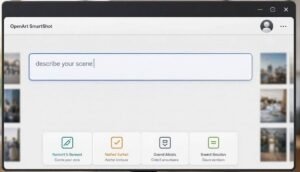
Instead of technical specs, I just wrote a director’s brief:
Copy this description: Monsoon night in a narrow Bombay service alley. Amber sodium street lamps overhead. A single tungsten bulb glowing from a small chai stall at the far end. A detective in his 30s, wet trench coat, sprints through the alley, chased by a taller man in a leather jacket. The detective stops, spins, and squares up. The attacker swings a hard right hook. The detective ducks, plants his feet, and counters with a left to the ribs. The attacker doubles over. The detective grabs his collar, slams him into the wet brick wall. End on the detective standing over him, breathing heavy, rain streaming down. Make this feel like a Christopher Nolan film. Gritty, real, weight in every movement.
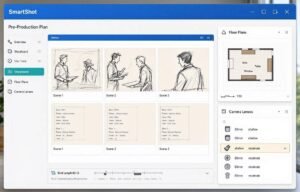
When I hit “Preview Sheet,” SmartShot acted like an entire pre-production team. In seconds, it generated:
- Character Reference Sheets: Both the detective and the antagonist rendered from multiple angles.
- Set Design: What the alley looks like, including wet brick and tungsten lighting.
- Floor Plans: A top-down view of where the characters run, collide, and where the camera goes.
- Storyboard: Every single shot had a real camera lens choice (e.g., 40mm anamorphic, 75mm anamorphic).
It did all of this from one paragraph. I wasn’t a prompt engineer anymore. I was the director.
Comparison Table: Manual Prompting vs. SmartShot
Pros & Cons of AI Filmmaking
Pros:
- Zero Barrier to Entry: You don’t need a camera, crew, or budget.
- Speed: What took James Cameron 15 years can be prototyped in 15 minutes.
- Director-Level Control: Tools like SmartShot let you focus on the story and emotion, not the technical specs.
Cons:
- The Uncanny Valley: Some AI physics still look slightly off on close inspection.
- Face Consistency: Without uploading reference faces, AI can sometimes blend two characters’ faces together.
- Not a Replacement for Story: AI can generate the shots, but it cannot generate the human emotion behind the idea.
FAQ Section
What is the best AI for cinematic images?
GPT Image 2 is currently the best for cinematic images because it understands prompt accuracy, renders text (even in Hindi), and adds useful production details like color palettes.
What is the best AI for cinematic video?
Seedance 2.0 is currently the best for cinematic video. It handles complex camera movements like dolly shots and can render difficult action sequences like fight scenes better than Veo 3.1.
How does OpenArt SmartShot work?
SmartShot combines GPT Image 2 and Seedance 2.0 into one tool. Instead of writing prompts, you write a natural description of your scene, and the AI generates a full pre-production plan (storyboards, lens choices) before creating the video.
Can AI make a full movie yet?
No, but it can make full cinematic scenes and trailers. The story, emotion, and human craft are still the filmmaker’s job, but the technical execution is now fast and affordable.
Final Verdict & Strong CTA Rating: 9.5/10 If you have a story in your head that you thought you could never make, you can make it now. The gap between having an idea and putting a working cinematic scene on screen has shrunk to seconds.
Want more AI design prompts and workflows? Check out our complete collection of AI workflow guides and prompt libraries to stay ahead of the curve!