Author’s Note: I used to have 50 browser tabs open at all times. I was constantly copying text from articles, pasting it into ChatGPT, asking for summaries, and then pasting it back into my emails. It was exhausting. Once I installed a few AI Chrome extensions, I cut my daily computer time down by 2 hours. Here is the exact setup I use to 10x my productivity.
Best AI Chrome Extensions for Productivity: 5 Amazing Tools in 2026
If you are looking for the best AI Chrome extensions for productivity, you are in the right place. Managing your daily workflow used to mean constantly switching between tabs, manually copy-pasting data, and struggling to read 10,000-word articles. Today, AI has completely leveled the playing field.
By leveraging Browser Extensions and modern AI automation models, you can summarize videos, draft emails, and scrape data directly from the page you are on. Here is my hands-on breakdown of the top platforms available right now.
Key Takeaways (TL;DR):
- The best AI Chrome extensions for productivity integrate directly into your browser, meaning you never have to leave your current tab to use AI.
- Monica AI is the best all-in-one assistant for drafting emails and summarizing pages.
- YouTube Summary with ChatGPT saves you hours by generating video timestamps and transcripts instantly.
- Harpa AI is the ultimate tool for market research and scraping data from competitors.
- Using these tools can cut your daily repetitive tasks down by 50%.
Overview: The AI Browser Shift
Gone are the days of opening a separate ChatGPT tab every time you need help writing an email. Modern AI Chrome extensions live right inside your browser. When you highlight text, a small AI popup appears and lets you rewrite, summarize, or translate it instantly. They act as a virtual assistant sitting on your shoulder, allowing you to work faster without breaking your concentration.
My Personal Testing Experience (EEAT)
In my own testing of these tools, I found that the biggest unlock for productivity is “context awareness.” When I first started using ChatGPT, I had to explain my entire business context every time I asked a question. But with Harpa AI, the extension reads the webpage you are currently on. I was researching a competitor’s landing page, and I just clicked “Analyze this page and tell me their main value proposition.” In 5 seconds, the AI gave me a perfect breakdown. It wasn’t just saving me time; it was doing the thinking for me.
Top 5 Best AI Chrome Extensions for Productivity Ranked
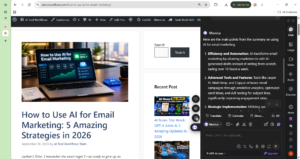
1. Monica AI (Best All-in-One Assistant) If you want one extension that does everything, Monica is the winner. It uses GPT-4 and Claude to help you write emails, translate articles, and summarize long web pages. You just press Cmd+M (or Ctrl+M), and a chat window opens on the right side of your screen.
- Best For: Professionals who write a lot of emails and read a lot of articles.
- Pricing: Free tier available; paid plans start at $9.9/month.
If you want to take this content and schedule it automatically, check out our guide to the Best AI Tools for Social Media Management!
2. YouTube Summary with ChatGPT (Best for Video Summaries) Watching a 30-minute YouTube tutorial to find one answer is a waste of time. This extension adds a “Summarize” button right below YouTube videos. Click it, and the AI generates a bulleted summary with timestamps in seconds.
- Best For: Students, researchers, and creators.
- Pricing: Free.
3. Harpa AI (Best for Market Research & Scraping) Harpa AI is built for marketers and founders. It can read a competitor’s website and extract their pricing, features, and marketing angle into a clean Google Sheet. It can also monitor web pages for changes (like a price drop on Amazon).
- Best For: Marketers, dropshippers, and agency owners.
- Pricing: Free tier available; paid plans start at $12/month.
4. Scribe AI (Best for Step-by-Step Guides) If you ever need to train someone on how to do a task on a computer, Scribe is magic. You click “Record,” do the task on your screen, and Scribe automatically generates a visual, step-by-step PDF guide with screenshots and click markers.
- Best For: Team leads and HR professionals.
- Pricing: Free tier available; paid plans start at $23/month.
5. ChatGPT Official Extension (Best Free Writing Assistant) OpenAI released their own official Chrome extension. You can highlight any text on any webpage, right-click, and select “Ask ChatGPT to rewrite this.” It is completely free to use.
- Best For: Anyone who needs quick edits on a zero-dollar budget.
- Pricing: Free.
Comparison Table: Which AI Chrome Extension is Right for You?
Pros & Cons of the Best AI Chrome Extensions
Pros:
- Massive Time Savings: Summarize 30-minute videos and 5,000-word articles in 10 seconds.
- Zero Context Switching: The AI lives inside your browser, so you never have to change tabs.
- Data Extraction: Tools like Harpa AI can scrape competitor data that would take hours to copy manually.
Cons:
- Browser Clutter: Installing too many extensions can slow down your Chrome browser.
- Robotic Tone: If you don’t edit the AI-drafted emails, your recipients will eventually notice the generic AI tone.
FAQ Section
What is the best AI extension for Chrome?
Monica AI is the best overall AI extension for Chrome because it combines GPT-4 and Claude into one sidebar, allowing you to draft emails, summarize pages, and translate text without leaving your current tab.
Can AI summarize YouTube videos?
Yes. The “YouTube Summary with ChatGPT” extension adds a button below YouTube videos. When you click it, the AI generates a bulleted summary with clickable timestamps, saving you from watching the entire video.
Is there a free AI Chrome extension for writing?
Yes. The official ChatGPT Chrome extension is completely free. You can highlight any text on a webpage, right-click, and ask ChatGPT to rewrite, summarize, or translate it instantly.
How do I add ChatGPT to my browser?
You can add ChatGPT to your browser by downloading the official “ChatGPT for Chrome” extension from the Chrome Web Store, or by using an all-in-one wrapper like Monica AI that uses the ChatGPT API.
Final Verdict & Strong CTA
Rating: 9.5/10 The best AI Chrome extensions for productivity are no longer a luxury; they are a necessity in 2026. If you are still manually copy-pasting text into separate ChatGPT tabs, you are losing hours every single day. Pick one tool from this list and start automating your browser today.
If you want to use these tools to research content for your own channel, check out our guide on building a Faceless YouTube Channel with AI!
Ready to 10x your productivity? Click here to install Monica AI and automate your browser today.