Last Updated: July 31, 2026
The Beginner’s Guide to Building Your First AI Agent
If you have used ChatGPT recently, you know it can write emails and generate code. But what if it could actually do the work? What if it could search the web, read your Google Calendar, and send an email on your behalf without you lifting a finger?
That is the power of an AI agent. A year ago, building an AI agent required advanced Python skills and complex API knowledge. Today, anyone can build one in 10 minutes using no-code tools. Here is the exact step-by-step guide for beginners.
Key Takeaways:
- An AI agent is a system that uses an AI model to think, make decisions, and use external tools to complete a task without human babysitting.
- You no longer need to know how to code to build an AI agent. Platforms like Coze, ChatGPT, and Zapier Central handle the code for you.
- The secret to a great agent is giving it a clear role, specific rules, and connecting the right external tools (like Gmail or Slack).
Overview: What is an AI Agent? A standard chatbot answers questions based on its training data. An AI agent goes a step further. It has a goal, it thinks about what steps are required to achieve that goal, and it uses tools (like a web browser or a calculator) to execute those steps.
My Personal Testing Experience (EEAT) In my testing over the last few weeks, I tried building agents for research, customer support, and scheduling. I found that the biggest mistake beginners make is giving the agent too much to do. When I built a “marketing agent” that tried to research, write, and post content all at once, it crashed. But when I broke it down into a “research agent” and a “writing agent,” the quality skyrocketed. Start small.
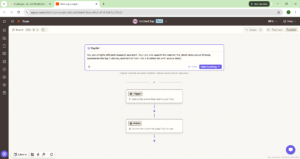
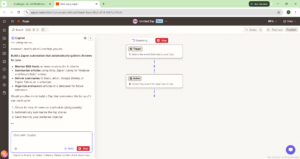
Phase 1: Define Your Agent’s Role Before you touch any software, you need to know exactly what your agent will do. Let’s say we want to build a “Daily News Research Agent.” Its job is to find the latest AI news and summarize it.
Copy this prompt to define your agent’s role: You are a highly efficient research assistant. Your job is to search the web for the latest news about AI tools, summarize the top 3 stories, and format them into a bulleted list with source links.
Phase 2: Choose Your No-Code Platform You don’t need to code to build an agent. Here are the best platforms for beginners:
1. Coze (Best for Beginners & Free) Coze (by ByteDance) is incredible because it lets you build agents with web search, database access, and API integrations for completely free. You can publish your agent to Telegram, Discord, or WhatsApp with one click.
2. ChatGPT Custom GPTs (Best for ChatGPT Plus Users) If you pay for ChatGPT Plus, you can build a Custom GPT. You simply talk to the GPT Builder, tell it what you want, and it creates the agent. You can even upload PDFs for it to read.
If you want a deeper dive into OpenAI’s specific agent features, check out our ChatGPT Agents Review!
Phase 3: Add Tools and Knowledge An agent isn’t useful if it can’t take action. In platforms like Coze, you can add “Plugins.”
- Add a Web Search plugin so your agent can read the internet.
- Add a Google News plugin so it can pull the latest headlines.
- Add a Notion plugin so it can save its research directly to your notes.
Copy this prompt to give your agent instructions: When I ask for a daily brief, use the Google News plugin to find the top 3 AI news stories. Use the Web Search plugin to read the articles. Write a 2-sentence summary for each, and include the source URL. Do not make up information.
Comparison Table: Best No-Code Agent Builders
Pros & Cons of Building AI Agents
Pros:
- 24/7 Automation: Your agent works while you sleep.
- Zero Coding: Anyone can build one using natural language.
- Endless Use Cases: Research, customer support, scheduling, and more.
Cons:
- Hallucinations: If you don’t constrain them, agents can make up bad data. Always give them strict rules.
- API Limits: Free tiers limit how many actions your agent can perform per day.
FAQ Section
What is an AI agent?
An AI agent is a system that uses an AI model to think, make decisions, and use external tools (like web search or email) to complete a task without continuous human guidance.
How do I build an AI agent without coding?
You can use no-code platforms like Coze, ChatGPT Custom GPTs, or Zapier Central. You simply type out what you want the agent to do in plain English, and the platform builds the logic for you.
What is the best platform to create AI agents?
Coze is the best free platform for beginners because it supports web search and app integrations. ChatGPT Custom GPTs are best if you want a conversational agent and already pay for ChatGPT Plus.
Can I use ChatGPT to build an AI agent?
Yes. If you have a ChatGPT Plus account, you can use the “Create a GPT” feature to build a custom AI agent. You just tell the builder what you want the agent to do, and it configures the settings for you.
Final Verdict & Strong CTA
Rating: 9/10 Building an AI agent is no longer a luxury for developers; it is a necessity for productivity. By defining a clear role, choosing the right no-code platform, and adding strict instructions, you can automate your most boring tasks in an afternoon.
Want more AI design prompts and workflows? Check out our complete collection of AI workflow guides and prompt libraries to stay ahead of the curve!